Best To-Do List Apps for Getting Things Done
Best to-do list apps compared for 2026. Find the top task manager for staying organized, hitting deadlines, and finally getting things done.
Best to-do list apps are the difference between a plan you actually follow and a plan that lives in your head until you forget half of it. If you’ve ever written a task on a sticky note, lost the sticky note, and then remembered the task three days late in the shower, you already know why a good to-do list app matters. The right one doesn’t just store your tasks. It nudges you toward finishing them.
There are hundreds of task management apps on the market right now, and most of them look nearly identical from a screenshot. A text box, a checkbox, a due date. That similarity is exactly why picking one feels harder than it should. The apps that actually change how you work tend to differ in the details: how fast you can add a task, whether it understands “next Tuesday at 3pm” without you touching a menu, whether it syncs across your phone and laptop without a hiccup, and whether it nags you in a helpful way instead of an annoying one.
This guide walks through the best to-do list apps for 2026, based on what each one does well, who it fits, and where it falls short. Whether you’re a solo freelancer juggling client deadlines, a student managing five classes, or someone who just wants their grocery list and work tasks in one place, there’s an app on this list built for you. We’ll also cover what separates a genuinely useful task manager from one that just adds another app icon to your home screen.
What Makes a To-Do List App Actually Work
Before ranking anything, it helps to know what you’re grading against. A productivity app earns a permanent spot on your phone for a few specific reasons, and it loses that spot for equally specific ones.
Quick Capture Matters More Than Features
The single biggest predictor of whether a to-do list app sticks is how fast you can get a task out of your head and into the app. If opening the app, tapping through three menus, and setting five fields takes longer than the task itself, you’ll stop using it within a week. The best apps let you type a task and move on, often parsing dates and priorities automatically from plain language like “call the dentist Friday morning.”
Reliable Sync Across Devices
A task list that only lives on one device isn’t a system, it’s a notebook. You need the same list on your phone, your laptop, and ideally your smartwatch, updating instantly no matter where you added something. Sync failures are one of the fastest ways people abandon a task tracking tool entirely, because a missed or duplicated task breaks trust in the whole system.
Realistic Prioritization
Every task app lets you add a due date. Fewer help you figure out what to actually do first when you have thirty things on your list and eight hours in the day. Features like priority flags, smart lists, and AI scheduling exist to solve this exact problem, and the apps that do it well save you the daily ritual of re-sorting your own brain every morning.
A Free Tier That’s Actually Useful
A free to-do list app should let you run your real life on it, not just tease you with a trial. Paid tiers are fine, and often worth it, but if the free version is crippled to the point of being useless, that’s a red flag about the company’s priorities.
The 10 Best To-Do List Apps for Getting Things Done in 2026
Here’s the full rundown, starting with the most well-rounded options and moving into specialists.
1. Todoist — Best Overall To-Do List App
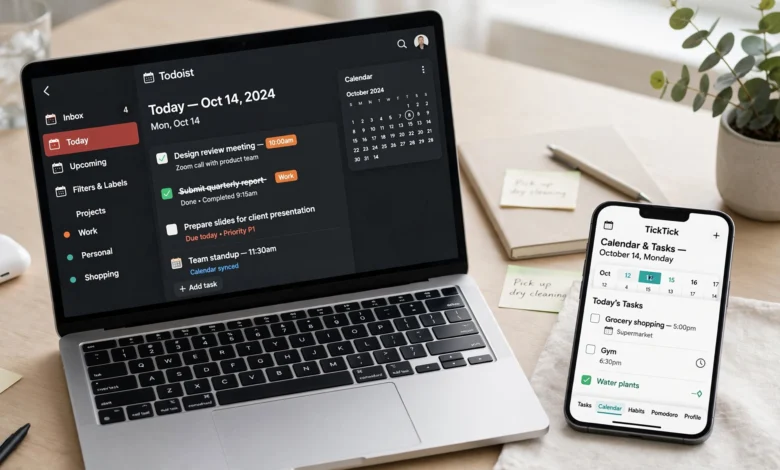
Todoist remains one of the most trusted names in task management for a reason: it does the fundamentals better than almost anyone. Type “submit report every second Thursday at 3pm” and Todoist sets the date, time, and recurrence without you touching a single dropdown. That natural-language parsing alone saves minutes every day, and minutes add up.

- Works on nearly every platform, including Linux and both major smartwatch operating systems
- Clean, fast interface with minimal learning curve
- Recently added a voice-to-task feature that turns spoken thoughts into organized entries
- Generous free plan, with Pro priced affordably for individuals
Limitations: Todoist is a task manager first, not a calendar. It shows what’s due when, but it doesn’t truly merge with your calendar or support real time blocking without extra setup. If you’re someone who wants to see your day laid out visually, you may need to pair it with another tool.
Best for: Individuals and families who want one clean app for tasks and shared lists, powerful enough to matter but simple enough to actually stick with. According to Zapier’s independent testing of productivity software, tools in this category are judged on real-world use rather than feature checklists, and Todoist consistently holds up under that kind of scrutiny.
2. TickTick — Best for Personal Productivity
TickTick combines a to-do list, calendar, habit tracker, and Pomodoro timer into one app without feeling bloated. It’s a favorite among people managing a mix of recurring personal goals and client work, since it handles both without forcing you into separate systems.
- Built-in habit tracking alongside standard task lists
- Calendar view for visualizing your week (paid tier)
- Pomodoro timer for focused work sessions
- Strong free tier that includes themes and habit tracking
Best for: People who want a single app that replaces three or four separate productivity tools.
3. Things 3 — Best for Stylish, Focused Task Organization
If you’re on Apple devices and care about design as much as function, Things 3 is worth the one-time purchase. It’s built specifically for iOS, iPadOS, and macOS, and the tradeoff for that focus is a genuinely polished, distraction-free experience.
- Clean visual hierarchy that makes long lists easy to scan
- Organized around Areas, Projects, and Today views
- No subscription, one upfront cost per platform
- Excellent keyboard shortcuts for power users on Mac
Limitations: No Android or Windows version, so it’s a non-starter if your household or team isn’t all-Apple.
4. Motion — Best for AI Scheduling Assistance
Motion takes a different approach than a traditional task list. Instead of just showing you what’s due, it actively schedules your tasks into open slots on your calendar using AI, then reshuffles automatically when meetings get added or something runs long.
- Automatically time-blocks tasks around your existing calendar
- Works backward from project deadlines to schedule individual steps
- Adjusts your day in real time as priorities shift
- Genuinely useful for people with unpredictable schedules
Limitations: It’s expensive relative to a standard to-do list app, and you’re trusting an algorithm to make judgment calls about your day, which occasionally means it schedules focused work at an odd hour. The mobile app is also clearly secondary to the desktop experience.
Best for: People with chaotic calendars who need more than manual planning but don’t want to spend half an hour every morning organizing their own day.
5. Microsoft To Do — Best for Microsoft Ecosystem Users
If your work already runs through Outlook, Teams, and Office, Microsoft To Do is the path of least resistance. It’s free with any Microsoft account and syncs natively with Outlook tasks and flagged emails.
- Seamless integration with Outlook and the wider Microsoft 365 suite
- Simple, uncluttered interface with minimal learning curve
- “My Day” feature that resets each morning to encourage fresh prioritization
- Completely free, including Edu licenses for students
Limitations: It’s light on advanced features like time blocking or AI scheduling, and it’s less appealing if you’re not already tied into Microsoft’s ecosystem.
6. Google Tasks — Best Free To-Do List App for Gmail Users
Google Tasks is baked directly into Gmail and Google Calendar, which makes it almost frictionless if that’s where you already live. You can turn an email into a task with a couple of clicks, and it shows up right alongside your calendar events.
- No separate app download needed if you use Gmail on desktop
- Turns emails into tasks instantly
- Syncs automatically across every device tied to your Google account
- Entirely free, no premium tier required
Limitations: It’s intentionally simple. There’s no natural-language date parsing, no priority levels, and no automation. It’s a list, not a full task management system.
7. Any.do — Best for Simple Task Management With Family Sharing
Any.do aims squarely at people who want one clean app for tasks, calendar, and shared lists without a steep learning curve. It’s particularly strong for households that need to split grocery runs, chores, and errands across multiple people.
- Shared lists that update in real time for family or roommates
- Clean calendar and task integration in a single view
- Daily planner mode that prompts you to organize your day each morning
- Reasonable free tier for individuals
Best for: Individuals and families who want simplicity over a long feature list.
8. Notion — Best for Custom Task Systems and Note-Taking
Notion isn’t a dedicated to-do list app, it’s a flexible workspace that can be shaped into one. If you already use Notion for notes, docs, or project planning, building your task list inside it keeps everything in a single place.
- Fully customizable databases, views, and templates
- Combines notes, wikis, and task tracking in one workspace
- Powerful for teams that need shared documentation alongside tasks
- Free tier is generous for individuals
Limitations: The flexibility that makes Notion powerful also makes it slow to set up. If you want something you can open and use in five minutes, this isn’t it. It rewards people willing to invest time in building their own system.
9. Superlist — Best Free Option for Small Teams
Superlist is built for individuals and teams up to five people, and it’s free at that scale, which makes it a standout for freelancers who occasionally collaborate with a small crew.
- Clean, modern interface built for both solo and shared use
- Free for individuals and small teams
- Combines simple task capture with light project structure
- Cross-platform sync across phone, desktop, and web
Best for: Small teams or solo operators who need occasional collaboration without paying for full-blown project management software.
10. Akiflow — Best for Calendar-Centric Task Management
Akiflow solves a specific problem: it pulls tasks from everywhere, Todoist, Asana, Notion, Gmail, Slack, into one unified inbox, then lets you drag them directly onto your calendar for real time blocking.
- Universal inbox that consolidates tasks from other tools
- Forces intentional time blocking rather than a passive list
- Useful for people already juggling multiple task sources
- Steeper price point aimed at professionals, not casual users
Best for: People who already use several tools and need one place to unify and schedule everything.
Free vs Paid To-Do List Apps: What’s Actually Worth Paying For
Most people don’t need to pay for a task manager, but some genuinely benefit from it. Here’s how to think about the tradeoff.
Free to-do list apps like Google Tasks and Microsoft To Do are hard to beat for basic capture and reminders. They lack power-user features like time blocking or AI scheduling, but if your needs are straightforward, they’ll cover you without ever asking for a credit card.
Apps like Todoist and TickTick sit in the middle. Their free tiers are genuinely usable for daily life, list views, boards, basic habit tracking, but the paid tiers unlock calendar integration, more automation, and higher limits on things like reminders or filters. For most people who’ve outgrown a plain checklist, this is the sweet spot.
At the top end, tools like Motion and Akiflow charge a real subscription because they’re doing real work: actively scheduling your day, pulling from multiple sources, and adjusting on the fly. These make sense if your schedule is genuinely complex and unpredictable. If your days look roughly the same week to week, you’re likely paying for horsepower you won’t use.
A simple rule of thumb: a paid to-do list app should save you more time than it costs you in money. If you can’t point to a specific feature that saves real minutes every day, stick with a free option.
How to Choose the Best To-Do List App for You
With so many strong options, the right choice comes down to matching the app to your actual habits rather than chasing the app with the most features.
- Identify your primary use case. Are you managing solo errands, a small team’s shared workload, or full projects with deadlines and dependencies? A task tracking app built for solo use will feel thin for a team, and a full project management tool will feel like overkill for a personal grocery list.
- Test the quick-add experience first. Before evaluating anything else, add five real tasks from your actual life. If it feels slow or clunky on task three, that friction will compound every single day.
- Check your platform coverage. If you split time between an iPhone and a Windows laptop, an Apple-only app like Things 3 is off the table no matter how good it looks.
- Decide if you need calendar integration. If your day is driven by meetings and appointments, a to-do list app that doesn’t talk to your calendar will always feel like it’s missing half the picture.
- Start with the free tier. Nearly every app on this list has a usable free plan. Live in it for two weeks before paying for anything. You’ll know quickly whether the app fits how you actually work.
Tips for Getting Things Done With a To-Do List App
Owning the right app is only half the equation. How you use it matters just as much.
- Capture everything immediately. The moment a task enters your head, get it into the app. Trying to remember things is what got you here in the first place.
- Review your list daily, not just when you’re overwhelmed. A five-minute morning review keeps your list trustworthy instead of turning it into a graveyard of stale tasks.
- Break big tasks into smaller ones. “Finish project” is not a task, it’s a headline. Break it into steps small enough that each one takes under an hour.
- Use due dates sparingly. If everything has a deadline, nothing feels urgent. Reserve real due dates for things with actual consequences.
- Delete or archive dead tasks. A list cluttered with things you’ll never do trains you to ignore it. Be ruthless about clearing out what no longer matters.
These habits echo the core ideas behind the “Getting Things Done” methodology popularized by David Allen’s GTD framework, which argues that a trusted external system, not your memory, is what actually frees up mental space to focus on the work itself.
Final Thoughts
Choosing among the best to-do list apps isn’t about finding the one with the longest feature list, it’s about finding the one that fits how you actually think and work, so you’ll still be using it in six months instead of abandoning it after two weeks. Todoist remains the strongest all-around pick for most people, TickTick and Any.do are excellent for those who want habits and family sharing built in, Things 3 is unmatched if you’re fully in the Apple ecosystem, and Motion or Akiflow are worth the investment if your schedule is genuinely chaotic and needs active management rather than a passive list.
Free options like Google Tasks and Microsoft To Do cover the basics well if you don’t want another subscription. Whichever task management app you choose, the real win comes from using it consistently: capture tasks the moment they appear, review your list daily, and let the app carry the mental load so you can spend your energy actually getting things done.