How to Stop Internet Throttling by Your ISP
Internet throttling can quietly wreck your speeds. Here's how to spot it, understand why it happens, and take back control of your connection.
Internet throttling happens more often than most people realize, and most never notice until their Netflix buffers every night around 8 p.m. or their video calls start freezing at the worst possible moment. If you’ve ever wondered why your connection feels fine in the morning but crawls by evening, or why speeds tank the moment you start big download, you might dealing with ISP throttling.
This is when your internet service provider deliberately slows down some or all of your traffic, usually without telling you directly. It’s frustrating because you’re still paying for the same plan, but you’re not getting what you signed up for. The good news is that throttling isn’t something you have to just accept.
Once you understand why ISPs do it and how to spot the pattern, there are practical, tested ways to work around it or push back on it. In this guide, we’ll walk through what throttling actually is, how to confirm it’s happening to you, and the real steps you can take to reduce or stop it, from simple habit changes to using a VPN to knowing when it’s time to switch providers.
What Is Internet Throttling, Exactly?
Internet throttling, sometimes called bandwidth throttling or data throttling, is when your ISP intentionally reduces your connection speed instead of giving you the full bandwidth you’re paying for. It’s not the same as a slow connection caused by old equipment or a bad Wi-Fi signal. Throttling is a deliberate choice made on the provider’s end, usually tied to one of a few common triggers:
- Data caps – once you cross a certain usage threshold in a billing cycle, your speeds drop for the rest of the month.
- Network congestion – during peak hours, ISPs may slow down heavy users so everyone else gets a fair share of bandwidth.
- Traffic type – some providers slow down specific activities like streaming, gaming, or torrenting, while leaving other traffic untouched.
- Plan-based limits – cheaper plans sometimes come with built-in speed caps that only show up under certain conditions.
Throttling isn’t automatically illegal or even always a bad thing. On mobile networks especially, it can help distribute limited bandwidth fairly across a crowded cell tower. The problem is when it’s applied without warning, targets specific apps or services unfairly, or isn’t disclosed clearly in the terms of service.
Why Do ISPs Throttle Your Connection?
Understanding the “why” helps you figure out which fix will actually work for your situation. ISPs generally throttle for a handful of reasons:
Managing Network Congestion
When too many people in one area are online at the same time, usually in the evening, providers may slow down heavy users to keep the network usable for everyone else.
Enforcing Data Caps
If your plan has a monthly data limit, going over it often triggers automatic speed reductions rather than extra charges. This is common with satellite and some cable internet plans.
Reducing Costs
Streaming video and large file transfers eat up a lot of bandwidth. Some providers throttle these activities specifically to cut down on the load on their infrastructure.
Pushing Upgrades
Occasionally, throttling is used, intentionally or not, as a nudge toward a higher-tier plan. If your speeds mysteriously improve after an upgrade call, that’s not a coincidence.


How to Tell If You’re Being Throttled
Before you try to fix anything, you need to confirm throttling is actually happening. Random slowdowns aren’t always your ISP’s doing, sometimes it’s your router, your Wi-Fi channel, or just too many devices connected at once. Here’s how to check:
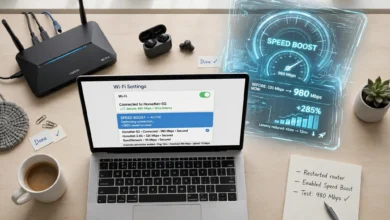
- Run a baseline speed test. Use a tool like Speedtest.net or Fast.com at different times of day, especially during your slowest periods. Note the download and upload numbers.
- Compare against your plan’s advertised speed. If you’re consistently getting less than 70-80% of what you’re paying for, especially at predictable times, that’s a red flag.
- Test with a VPN turned on. Connect to a VPN server and run the same speed test again. If your speeds noticeably improve with the VPN active, your ISP is likely throttling based on what it can see in your unencrypted traffic.
- Test specific activities separately. Check speeds while streaming, gaming, and just browsing. If one activity consistently performs worse than the others under identical conditions, you’re probably looking at targeted throttling rather than general congestion.
- Keep a log. Screenshot your results over a week or two, with timestamps. This record is useful both for your own diagnosis and if you ever need to raise the issue with your provider or a regulator.
Independent tools like Measurement Lab, a research project backed by universities and internet organizations, can also help confirm whether specific traffic types are being deprioritized on your network.
7 Proven Ways to Stop Internet Throttling
Once you’ve confirmed throttling is real and not just a router problem, here’s what actually works.
1. Use a VPN
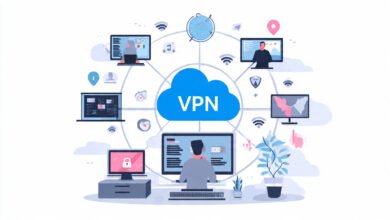
A VPN encrypts your traffic and routes it through a remote server, which hides what you’re doing online from your ISP. If your provider throttles based on traffic type, like slowing down streaming or torrenting specifically, a VPN can prevent that because your ISP can no longer tell what kind of data you’re sending. Keep in mind a VPN won’t help if the throttling is due to overall network congestion or a hard data cap, since it can’t create bandwidth that isn’t there. Stick with a paid, reputable VPN service. Free VPNs often come with their own bandwidth limits and slow, overcrowded servers, which can make your connection worse rather than better.
2. Monitor and Manage Your Data Usage
If your plan has a data cap, staying under it is the simplest way to avoid usage-triggered throttling entirely.
- Install a data usage tracking app or check your router’s built-in usage dashboard.
- Lower streaming resolution from 4K or HD down to 480p or 720p when you don’t need the extra quality.
- Schedule large downloads, backups, or software updates for off-peak hours, typically late at night or early morning.
- Turn off auto-play and background video previews on social apps, which quietly burn through data.
3. Shift Heavy Usage to Off-Peak Hours
Congestion-based throttling tends to hit hardest in the evening, when everyone in your neighborhood is streaming or gaming at once. Moving big tasks, like cloud backups or large downloads, to early morning hours can help you avoid the worst of it.
4. Upgrade Your Internet Plan
Sometimes the fix is less about outsmarting throttling and more about outgrowing the problem. If you’re on an entry-level plan and regularly maxing out your bandwidth with multiple devices, streaming services, and smart home gadgets, a higher-tier plan with more bandwidth headroom might resolve the issue without any extra tools.
5. Contact Your ISP Directly
It sounds basic, but a phone call can clear up a lot. Ask specifically whether your plan includes a data cap, whether certain types of traffic are deprioritized, and whether there’s a way to opt out or upgrade to avoid it. ISPs are generally required to disclose data caps and throttling practices, so pushing for a clear answer is a reasonable ask.
6. Try a Proxy Server for Specific Tasks
A proxy server can mask your IP address for certain activities, similar to a VPN but usually without full traffic encryption. It’s a lighter-weight option if you just want to obscure the destination of your traffic for one app or task, though it offers less privacy protection overall and isn’t a complete substitute for a VPN.
7. Switch Internet Providers
If you’ve tried everything and throttling is still a constant issue, it may be time to shop around. Check what other providers serve your area, compare their data cap policies, and read the fine print on bandwidth management before signing up. Fiber and cable providers without hard data caps tend to throttle far less often than satellite or rural fixed-wireless services.
What About Net Neutrality and Your Legal Options?
Net neutrality rules, when in effect, generally required ISPs to treat all internet traffic equally and prohibited unfair, undisclosed throttling. That legal landscape has shifted over the years and varies depending on where you live, so the protections available to you depend heavily on your state and country’s current regulations. Regardless of the legal backdrop, ISPs are still expected to be transparent about data caps and network management practices.
If you believe your provider is throttling your connection unfairly or without proper disclosure, you can file a complaint with the Federal Communications Commission, which tracks consumer complaints about internet service and can prompt a provider to respond. Keeping your speed test logs handy makes any complaint you file much stronger, since it gives you concrete evidence rather than a general complaint about slow service.
Common Mistakes People Make When Dealing With Throttling
- Assuming every slowdown is throttling. Old routers, outdated Wi-Fi standards, and overloaded home networks cause plenty of slowdowns that have nothing to do with your ISP.
- Using a free VPN and expecting real results. Free services often throttle you themselves, just for a different reason.
- Not testing at multiple times of day. A single speed test tells you very little. Patterns matter more than one snapshot.
- Ignoring the fine print. Many data caps and traffic management policies are disclosed, just buried in the terms of service most people skip.
Final Thoughts
Internet throttling can feel like an invisible problem, since your ISP rarely announces when it’s happening. But once you know what to look for, spotting it isn’t hard, and dealing with it doesn’t have to mean living with slow speeds indefinitely. Start by confirming the problem with consistent speed tests at different times of day, then work through the fixes that match your specific cause: a VPN for traffic-based throttling, data management for cap-related slowdowns, or a provider switch if nothing else moves the needle.
Stopping internet throttling is rarely about one single trick; it’s about understanding your usage, knowing your rights as a customer, and being willing to push back when your provider isn’t delivering what you’re paying for.